Monday, 21 June 2021

Bluetooth remote controlled teleprompter

 It's 2021 and we're sadly still somewhat in the grip of the Covid-19 pandemic. Travelling near and far to speak at conferences is becoming a distant memory (but one I'm glad about in some ways, if only because it dramatically reduces my carbon footprint) but the conference industry has rallied and "gone online". Last year, many events were online for the first time ever and there was a lot of learning going on. There were teething problems. There was stress. But audiences were sympathetic, watching from their newly established home offices and online conferences went ahead, were well received and lessons were learned.

These days, I'm speaking at on average two conferences every month and we all seem to have a much better idea of what we're doing. Conference organisers have generally got rather good at what they now do and events tend to go smoothly. Speakers like me are enjoying larger audiences now that travel and associated costs and geography are no longer constraints. Perhaps the online event will become the new normal. I personally hope so. The carbon cost of your typical international conference must be off the charts and do we really all need to be physically in the same room to share knowledge and have a conversation? Of course we don't.

For speakers, online events feel very weird to begin with. You're sat in a room on your own, talking to your computer screen with no sense of the presence of any audience, large or small. But you get used to it.

In the past, I've always presented without any form of script. I prepare. I know my subject. My slides provide a framework within which I tell my tale of Bluetooth technology wonders (or something like that!). I get up on stage and do my thing. All good.

But remote presentations at online events have changed my approach. Sometimes talks are pre-recorded as videos. Some conference organisers prefer this or even stipulate this as they see it as lower risk (no fear of broadband issues on the day causing problems). And other times, they're delivered live.

Prompted by fears I might over-run my allocated time slot at one of the events I spoke at last year, I broke with my usual habit and wrote myself a script so that I could be sure I would not go off topic and waste time. This worked well enough but the question as to where you position your script so that you can read it without looking like you're reading a script was an issue. So, I came up with the following solution, which has been working very well for me.

I mount my webcam on a small tripod and place it on a pile of books on my adjustable monitor stand, right in front of the monitor so it is at eye level but does not block my whole view of the screen. I place my Android smartphone on a small tripod too and put it immediately behind the camera and just above it. 

My script takes the form of an HTML web page and I download it onto the phone from Google Drive. I long-press the file in the file manager application, select Share and then choose an application that I wrote called BleTeleprompter. This loads the script into the app. 

Meanwhile, I have a BBC micro:bit running some simple code that causes Bluetooth control data to be transmitted when I press (or long press) either of the device's two buttons. In my app, after loading the script, I scan for the micro:bit and connect to it. My script appears and.... I can scroll up or down by pressing the buttons on my micro:bit! 

So, when I deliver my scripted talks, I am looking slightly over the top of the camera at the script on my Bluetooth-controlled teleprompter. I use my mouse in my right hand to advance my slides and the micro:bit in my left to scroll my script. Simples!

Here's the app in use:

1. Selecting the script file and sharing to BleTeleprompter

2. Script loaded into the app

3. Discovering the BBC micro:bit scroll controller

4. The script on screen and ready for action

5. My view

6. Et voila!


And here's the micro:bit code:


Friday, 9 October 2020

Droidcon EMEA 2020

I was a speaker this year's online Droidcon EMEA conference and discussed issues such as the factors which affect application data rate, what really constrains range in Bluetooth communication (and how to increase it) and how Android developers can create applications with which to monitor and control Bluetooth mesh networks.

You can download my slides from here.

Educational resources for developers and other technical roles can be found at the Bluetooth SIG web site in the resources section, here. Note that code for the demonstrated Bluetooth mesh proxy application for Android, iOS and web is available in the study guide entitled "An Introduction to the Bluetooth Mesh Proxy Function".

Enjoy.

Martin


Wednesday, 22 April 2020

Droidcon Italy Webinar #1

We're in the midst of a global pandemic. People are isolated, working from home or.... just isolated. Conferences everywhere have been cancelled.

But Synesthesia, the company behind the excellent Android developer conference, Droidcon Italy didn't let that stop them. The annual conference itself was rescheduled to 27th/28th November, but to satisfy those of us hungry for knowledge right now, Synesthesia, working with the Bluetooth SIG also launched a series of webinars so that developers could get together virtually and listen to speakers share their knowledge on a range of topics, over the course of the summer.

I've been a speaker at Droidcon Italy a few times and covered a number of different aspects of Bluetooth. Yesterday, I was glad to have the opportunity to deliver the talk I'd created specifically for this year's Droidcon Italy, entitled "Advanced Bluetooth for Android Developers".

I talked about data rate, what it means and how to maximise it when transferring data between two devices using Bluetooth Low Energy (LE). There are various APIs available to Android developers which can be used to exercise key variables in how Bluetooth is working underneath those APIs. I reviewed those variables and the associated APIs and hopefully gave the audience a much deeper knowledge of what's really going on under the hood, what to expect from those APIs and exactly what can be achieved using them. I presented my own test results, where for example, transferring 100k of data took about 10 seconds using default settings but was reduced to about half a second with a larger ATT MTU, faster connection interval, the LE 2M PHY and two devices which support the LE Data Packet Length Extension feature.


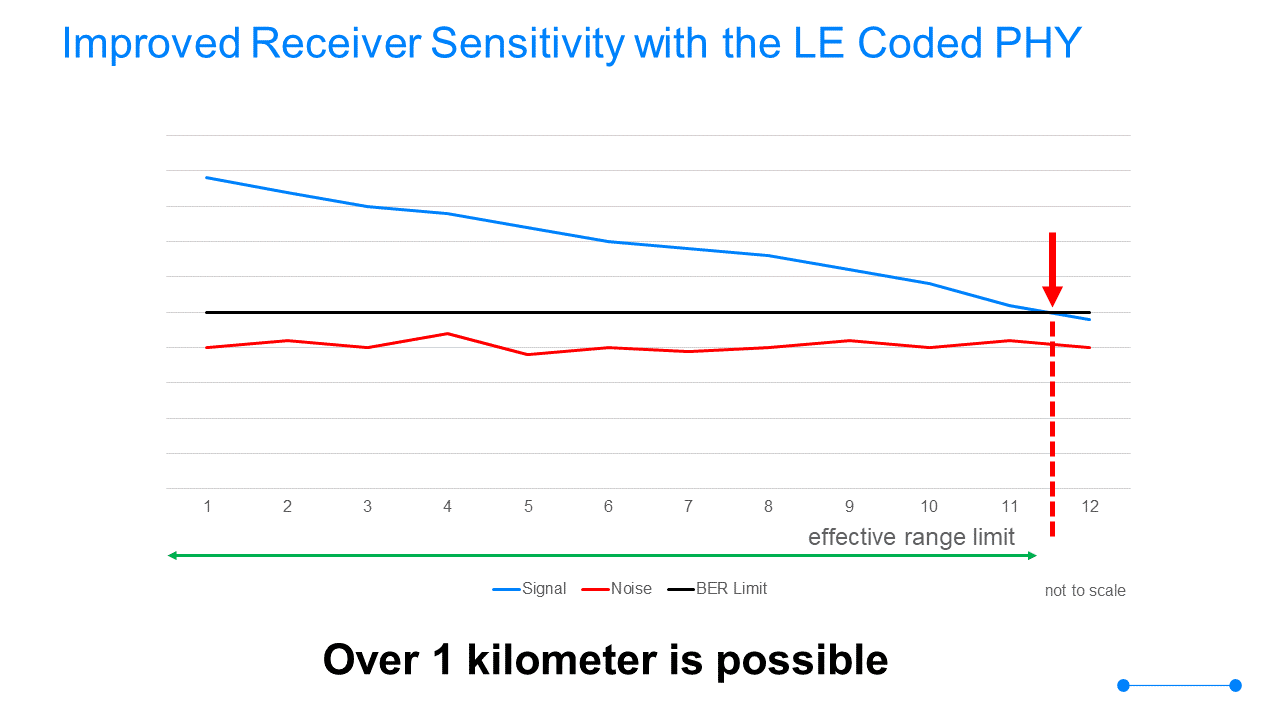
I talked about range. There are many people who still think that Bluetooth has a range of about 20 metres. In fact it's now over a kilometre, especially since Bluetooth 5 introduced the LE Coded PHY, which uses Forward Error Correction to increase receiver sensitivity. Android has APIs that lets you use this feature so that you can maximise communication range. There's some good high level information at the Bluetooth SIG web site about this topic: https://www.bluetooth.com/learn-about-bluetooth/bluetooth-technology/range/  and a deeper review in a paper about Bluetooth 5: https://www.bluetooth.com/bluetooth-resources/bluetooth-5-go-faster-go-further/


I also explained how broadcasting can be performed with Bluetooth LE so that communication is between one transmitting device and an unlimited number of receiving devices, what Advertising Extensions are, how they work and how they can be used.


I looked at Bluetooth mesh briefly, focusing on the fact that Android developers can create applications for the monitoring and control of devices and systems in a Bluetooth mesh network, using something called the Proxy Protocol.


Finally, I talked about the future. Platforms and APIs always lag behind the Bluetooth specifications. There are a number of exciting new capabilities in the Bluetooth core specification which have been released over the last year or so, which we may see appearing on Android and other platforms at some point. Key amongst them are Direction Finding using AoD (Angle of Departure) and LE Audio, the new Bluetooth audio technology which uses Bluetooth LE rather than the older Bluetooth BR/EDR, has a higher quality codec, supports multiple concurrent content streams, private or public audio sharing via audio broadcast and is designed for hearing aids. And sitting under LE Audio in the Bluetooth core stack in a feature called Isochronous Channels, which has potential utility beyond audio use cases. It allows time-bound data to be communicated to multiple devices concurrently, but acted upon (e.g in the case of audio, rendered) simultaneously.


My presentation slides are here: https://drive.google.com/open?id=1lXK0s-g9EtA9kLSHeCTnAyosrf5XDDma

I'm going to be delivering a second talk, on Bluetooth mesh later in the year. Hope you can make it.

Martin

Friday, 29 March 2019

Smart Home for Connected and Assisted Living

On Tuesday 26th March 2019, I was the keynote speaker at this event. I chose to talk about Bluetooth mesh but opened with some thoughts on what exactly the word "smart" might mean. How do we recognise the truly smart from the not so smart gadgets? And as a technical architect, how do I personally proceed in identifying the key issues leading to me making foundational smart home technology choices, which allow me to create a building which is smart today, but which can become smarter tomorrow as my requirements evolve and technology advances?

My presentation is available for download here.

Standing room only!

Friday, 21 December 2018

AmsterdamJS Meetup

AmsterdamJS is a popular meetup for web developers, held regularly in.... you guessed it... Amsterdam. I was a speaker there on 6th December and gave a talk on Web Bluetooth with a little bit of Bluetooth mesh thrown in.

I *tried* to do a number of live demos... with mixed results! I was reliant on the event's very flaky Wi-Fi / internet connection, which unfortunately gave out on me and prevented me from showing my Bitty Software controller demo. I also got hit by a loose battery connection which stopped my first mesh demo working at the first attempt (and nearly gave me a heart attack!). After fiddling with the battery connector, it worked though. In fact the mesh demo worked mostly very well despite having traveled in the hold of the plane and having been very much bumped around. Anyway... here it is.


Saturday, 10 November 2018

Embedded Linux Conference

A couple of weeks ago, I was a speaker at the Embedded Linux Conference in Edinburgh. This is an *excellent* event... if you're into that kind of thing. Which I am.

I spoke about Bluetooth mesh and included a live demo of a "thing" I made and have been tinkering with for a while. As demos go... it's not bad but I still need to find the time to finish testing and implementing a few optimisations. Geting there though.

The demo is a 8 x 8 grid of BBC micro:bits, all running the Zephyr OS and with the Bluetooth mesh generic onoff server and generic level server models implemented (by me) on each. I control the grid, or specific parts of it, identified by the various group addresses I used, from another micro:bit acting as a generic onoff client and from a Web Bluetooth application via an nRF52 which is acting as a Bluetooth mesh proxy node.

Anyway. Enjoy the talk!


Thursday, 23 August 2018

Bluetooth mesh developer workshop

Last night, on August 22nd 2018, I ran a Bluetooth mesh developer workshop, hosted by Skills Matter in London.

In truth, this was a pilot for when I run the same or a similar session at Bluetooth World in Santa Clara, in a few weeks time. I told the attendees they were guinea pigs in my evil experiment and happily, they were a good bunch with no particular problem with being likened to rodents.

Each attendee was given a free BBC micro:bit. This may have helped.

I ran through some basic theory to give each person the required foundational knowledge, focusing on "the essentials" from what is after all, a fairly big topic. I then illustrated some of the concepts with a live demonstration, involving a 66 node Bluetooth mesh network. It consisted of 64 BBC micro:bits, a nRF52 DK acting as a mesh proxy node and my laptop running a web application and using the Web Bluetooth APIs to communicate with the proxy and through it, the rest of the network. I'm happy to say it worked rather well, too!


After that, we turned our attention to the question of how firmware for Bluetooth mesh devices might be developed. I used the Zephyr RTOS as an example SDK which supports Bluetooth mesh and the class worked in teams towards having one micro:bit acting as a light switch, running the mesh generic onoff client model and another micro:bit acting as a node (maybe a light) which can be switched on or off through running the generic onoff server model.

Success!

I'd hoped we could get more coding done but my estimates of timing turned out to be a bit on the "optimistic" side. The positive side of this was that I had a great collection of people who asked question after question during the theory part, which I was really happy about.

The slides I used (with a few tweaks since yesterday) are here

A video of the entire workshop is here

Another which may be of interest:

Bluetooth mesh for Android developers

The official Bluetooth SIG web site has some great resources including presentation recordings but the one that budding mesh developers should download is the Bluetooth Mesh Study Guide which provides extensive hands on experience through a series of tutorials based around the Zephyr SDK.

A big thank you to my very nice guinea pigs and to Skills Matter for hosting!

Wednesday, 18 July 2018

Fullstack and Fullstack2gether

Last week I presented at the 3 day developer conference, Fullstack by Skills Matter in London. My topic was Web Bluetooth. The session was very well attended and my live demos worked. What more could you want?!

On the following Saturday, I also ran a Web Bluetooth coding workshop at the Skills Matter offices, which was great fun.

My Web Bluetooth presentation is available for download here. People wanting some hands on experience, should download the Web Bluetooth Tutorial from bluetooth.com. This is essentially what we did in the coding workshop. Enjoy!

Skillsmatter also video recorded the session. You need to register at their site to view it. Here's the link: https://skillsmatter.com/skillscasts/11944-creating-iot-applications-with-web-bluetooth


Wednesday, 27 June 2018

IoT Tech Expo, Amsterdam

Today, I presented at IoT Tech Expo in Amsterdam, in the Connected Industry track. My topic as usual was Bluetooth mesh in smart buildings. The session was really well attended and followed by a panel discussion I participated in, on "smart structures".

The slides from my presentation are available for download from here.


Thursday, 19 April 2018

Droidcon Italy 2018

I presented at Droidcon Italy today, the 3rd time in 4 years that I've been a speaker at the event. It was in a swanky new venue this year, very cool and very large.

Last year I focused on beacons. This year it was all about Bluetooth mesh and the opportunity that smartphone developers now have to create monitoring and control applications for smart buildings, smart industry and more.


Download the presentation slides (plus some a few extra I didn't have time to cover) from here.


Friday, 23 March 2018

RenderConf and Web Bluetooth

Today I had the pleasure to be a speaker at RenderConf in London. I can't tell you how impressed I was with this event. Professional, friendly and accessible (the first event I've ever seen do live captioning). And every speaker I saw, which was most of them were great speakers and evident experts in their field. Brilliant.

And.... this was the first web developer event I'd ever been to, never mind spoken at. The topic of my presentation was Web Bluetooth. I believe it should be a W3C standard. I see immense opportunities in creating web applications for monitoring and controlling smart buildings, industrial processes and IoT in general. The remote delivery of health care, incorporating the Bluetooth medical devices the patient has, is another obvious way this technology could deliver substantial value.

My talk introduced Web Bluetooth, how Bluetooth is being adopted more widely for enterprise applications and how in the enterprise world, the browser is the application platform. From this we must surely conclude that the browser needs Bluetooth. QED :-)

I did two live demos. Web browser versions of my Bitty Data Logger and Bitty Controller applications and they both worked a treat. I knew they would of course. I wasn't nervous. Oh no. Not a bit :-)


You can download my slides from here.

Enjoy!

And thank you, thank you, thank you to RenderConf!

Friday, 5 January 2018

Bitty Data Logger 3.2.0 - Formula Management

Bitty Data Logger allows expressions or formulae to be specified and applied at run time to data values sampled from the micro:bits connected pins. Analog pin values are always in the range 0-1023, regardless of what is connected to the pin and so a pin formula allows values to be transformed to something more meaningful like a Celsius temperature value. Version 3.2.0 adds a Formula Management screen so that lists of named formulae may be maintained and selected for use via the Settings screen. This makes use and reuse of formulae for different experiments and other activities, much easier.

Saturday, 23 December 2017

Debugging micro:bit code using the serial port and USB

Debugging micro:bit code can be tricky. It can only display one character at a time so the LED display is not a great option, though you'll be surprised how much you can still get done when you need to.

You can write full strings and variable values to the serial port however and so by connecting your micro:bit into a computer using a USB cable and firing up a terminal application like Putty, you can monitor serial output as your micro:bit code executes.

This is a great way to get to the bottom of weird code problems you just can't figure out!

Here's how you'd do this from C/C++

uBit.serial.printf("P0:%d P1:%d P8:%d P12:%d\r\n", pin0, pin1, pin8, pin12);


Friday, 15 December 2017

4tronix Bit:Bot and Bitty Controller

New hex files have been published at http://www.bittysoftware.com/downloads.html#controller which allow Bitty Controller to be used with the 4tronix Bit:Bot

Note that a new version of Bitty Controller is in development and this will provide data from the Bit:Bot sensors as well as allowing it to be driven. But there's no need to wait because both the existing d-pad and touchpad controllers in Bitty Controller work today as long as you install the right hex file on your Bit:Bot mounted micro:bit!

Provisioning a Silicon Labs Bluetooth mesh developer board

Provisioning is the process which makes a Bluetooth mesh device a secure member of a specific mesh network. It involves a smart phone or tablet, running an application known as the Provisioner and results in the Bluetooth device being issued with a series of security keys. Conceptually it's comparable with Bluetooth pairing but technically is not the same and is concerned with the security of a whole network, not just the security of a pair of devices.

For a more technical explanation of Bluetooth mesh, download the Bluetooth Mesh Technology Overview document from https://www.bluetooth.com/what-is-bluetooth-technology/how-it-works/le-mesh

There are also numerous blog posts on various aspects of the topic:

https://blog.bluetooth.com/category/bluetooth-mesh

Here's a quick demo of me provisioning a Silicon Labs Blue Gecko developer  board which is running a Bluetooth mesh stack with software models that make it equivalent to a mesh light.


Thursday, 14 December 2017

Remote control your smartphone camera with a micro:bit

Using your micro:bit as a remote control for the camera on your smartphone is easy.

I wrote a quick MakeCode application which lets you take a photo by pressing button A on the micro:bit and have shared it at this URL: 


The "Tell camera" block is in a special package called Devices. You need to add it to your MakeCode project. You do this by going into the Advanced section at the bottom of the list of block categories on the left, click Advanced, then Add Package and then select Devices. When it asks if you should remove the Radio package,confirm that it should.

The procedure you should then follow with an Android phone is this:

1. Download the hex file from MakeCode and copy it to a micro:bit. I used USB for this. 

2. In Android, go into Settings/Bluetooth and if the micro:bit is listed as paired, "Forget" it. You need to forget pairing every time you flash a hex file as the pairing details get deleted from the micro:bit, leaving the phone thinking it's paired and the micro:bit thinking it is not. They both need to think they are paired or they both need to think they are not paired otherwise Bluetooth communication will fail, with one side trying to perform encrypted communication and the other having no idea what's being said to it!

3. Launch the official Samsung micro:bit app. Select Connect and then PAIR A NEW MICRO:BIT.

4. Put your micro:bit into pairing mode using by holding A+B and pressing and releasing the reset button, all the time keeping A+B pressed. When "PAIRING MODE" appears, you can release A+B.

5. Complete pairing, following the instructions on the smartphone app.

6. Press reset to restart the micro:bit with the new code. You should briefly see a smiley icon appear and then vanish.

7. Now in the Connect screen, connect to the micro:bit you just paired (select it in the "Connect to previously paired micro:bit" section. After a short delay you should see "C" on the micro:bit. This means a Bluetooth connection was established.

8. Now press button A. This should cause your phone to open the camera app, count down 6 seconds and then take a photo.

Have fun.